Best Face Recognition Haar Cascade Download
In this article, we are going to see how to observe faces using a pour classifier in OpenCV Python. Face detection has much significance in dissimilar fields of today'southward earth. It is a significant stride in several applications, confront recognition (also used as biometrics), photography (for auto-focus on the face), face up analysis (age, gender, emotion recognition), video surveillance, etc.
Ane of the popular algorithms for facial detection is "haarcascade". It is computationally less expensive, a fast algorithm, and gives high accurateness.
Haarcascade file can be download from here: haarcascade_frontalface_default.xml
Information technology works in four stages:
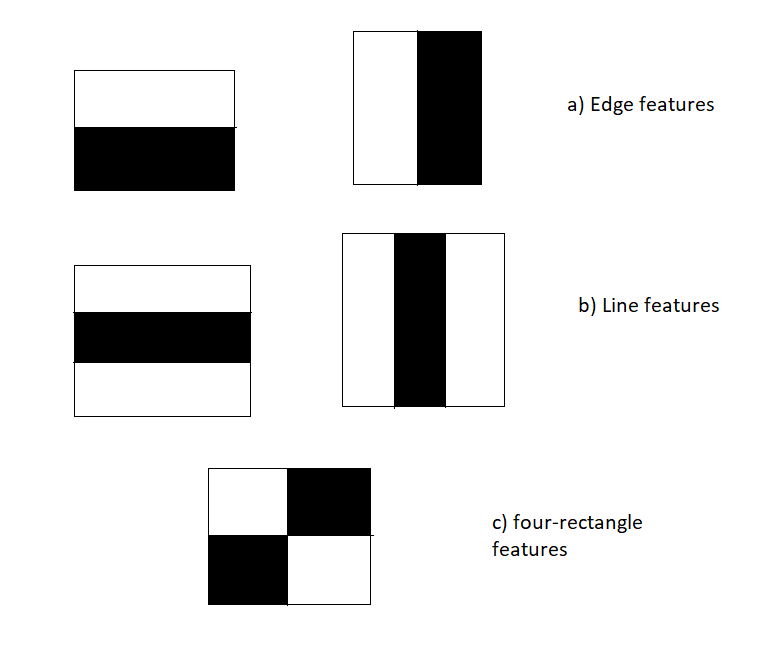
- Haar-feature selection: A Haar-like feature consists of dark regions and low-cal regions. It produces a single value by taking the difference of the sum of the intensities of the night regions and the sum of the intensities of light regions. It is done to extract useful elements necessary for identifying an object. The features proposed by viola and jones are:
- Cosmos of Integral Images: A given pixel in the integral image is the sum of all the pixels on the left and all the pixels above it. Since the procedure of extracting Haar-like features involves calculating the difference of dark and light rectangular regions, the introduction of Integral Images reduces the fourth dimension needed to complete this task significantly.
- AdaBoost Training: This algorithm selects the best features from all features. Information technology combines multiple "weak classifiers" (best features) into one "strong classifier". The generated "stiff classifier" is basically the linear combination of all "weak classifiers".
- Pour Classifier: It is a method for combining increasingly more complex classifiers like AdaBoost in a cascade which allows negative input (non-face up) to be quickly discarded while spending more computation on promising or positive face-like regions. It significantly reduces the ciphering time and makes the procedure more efficient.
OpenCV comes with lots of pre-trained classifiers. Those XML files can be loaded past cascadeClassifier method of the cv2 module. Hither we are going to use haarcascade_frontalface_default.xml for detecting faces.
Stepwise Implementation:
Step one: Loading the paradigm
Python
img = cv2.imread( 'Photos/cric.jpg' )
Step 2: Converting the image to grayscale
Initially, the image is a three-layer paradigm (i.e., RGB), So It is converted to a one-layer image (i.east., grayscale).
Python
gray_img = cv2.cvtColor(img, cv2.COLOR_BGR2GRAY)
Footstep iii: Loading the required haar-cascade XML classifier file
CascadeClassifier method in cv2 module supports the loading of haar-pour XML files. Here, we demand "haarcascade_frontalface_default.xml" for confront detection.
Python
haar_cascade = cv2.CascadeClassifier( 'haarcascade_frontalface_default.xml' )
Pace 4: Applying the face detection method on the grayscale image
This is done using the cv2::CascadeClassifier::detectMultiScale method, which returns boundary rectangles for the detected faces (i.e., x, y, w, h). It takes 2 parameters namely, scaleFactor and minNeighbors. ScaleFactor determines the factor of increment in window size which initially starts at size "minSize", and after testing all windows of that size, the window is scaled upwardly by the "scaleFactor", and the window size goes upwardly to "maxSize". If the "scaleFactor" is big, (e.chiliad., ii.0), there will be fewer steps, then detection will be faster, but nosotros may miss objects whose size is betwixt ii tested scales. (default scale factor is 1.three). Higher the values of the "minNeighbors", less will be the number of simulated positives, and less error will be in terms of fake detection of faces. However, at that place is a chance of missing some unclear face traces besides.
Python
faces_rect = haar_cascade.detectMultiScale(
grayness, scaleFactor = 1.one , minNeighbors = 9 )
Step 5: Iterating through rectangles of detected faces
Rectangles are fatigued around the detected faces by the rectangle method of the cv2 module by iterating over all detected faces.
Python
for (x, y, w, h) in faces_rect:
cv2.rectangle(img, (x, y), (x + w, y + h), ( 0 , 255 , 0 ), thickness = two )
cv2.imshow( 'Detected faces' , img)
cv2.waitKey( 0 )
Below is the implementation:
Python
import cv2
img = cv2.imread( 'Photos/cric4.jpg' )
gray_img = cv2.cvtColor(img, cv2.COLOR_BGR2GRAY)
haar_cascade = cv2.CascadeClassifier( 'Haarcascade_frontalface_default.xml' )
faces_rect = haar_cascade.detectMultiScale(gray_img, one.1 , 9 )
for (10, y, w, h) in faces_rect:
cv2.rectangle(img, (x, y), (ten + west, y + h), ( 0 , 255 , 0 ), two )
cv2.imshow( 'Detected faces' , img)
cv2.waitKey( 0 )
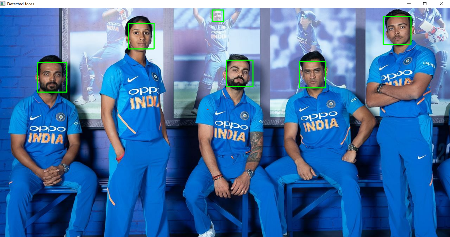
Output:
Attention geek! Strengthen your foundations with the Python Programming Foundation Course and learn the nuts.
To begin with, your interview preparations Heighten your Data Structures concepts with the Python DS Course. And to begin with your Machine Learning Journey, join the Machine Learning - Basic Level Course
DOWNLOAD HERE
Posted by: smithrapen1959.blogspot.com

Post a Comment for "Best Face Recognition Haar Cascade Download"